
Your internet fails. You still need ChatGPT. It happens more often than people admit. AI is now part of daily work, learning, and decision-making, but stable connectivity isn’t. Flights, travel, outages, and restricted networks offline moments are unavoidable. That’s why one question keeps coming up: can you actually use ChatGPT without the internet in 2026?
The direct answer: no, not fully. ChatGPT still depends on cloud-based models, which require an active connection. Any claim suggesting true offline ChatGPT is either outdated, misleading, or based on partial workarounds. However, recent advances have made it easier to stay productive even when you’re offline if you prepare correctly.
This guide cuts through the noise. You’ll learn what’s realistically possible, what isn’t, and which offline-ready tools and strategies come closest to delivering ChatGPT-like help when the web disappears. No hype. No guesswork. Just clear, practical answers for 2026.
Is ChatGPT Natively Available Offline in 2026?
Let’s be blunt: no. As of 2026, the official ChatGPT app and website still require an internet connection. OpenAI’s models run entirely in the cloud. Every prompt is sent to remote servers for processing, and every reply is streamed back. Without connectivity, ChatGPT simply can’t function in its native form.
You’ll see plenty of claims about “downloading ChatGPT” or running it offline. Most of these are misunderstandings. The real model is enormous, expensive to run, and tightly controlled. OpenAI does not provide a downloadable version of ChatGPT for personal devices, and there’s no official offline mode.
That said, offline AI is evolving fast. While you can’t run ChatGPT itself offline, there are practical alternatives and smart workarounds that can keep you productive when the internet drops. Let’s walk through what actually works.
Why Doesn’t ChatGPT Work Offline?
ChatGPT doesn’t work offline because the model behind it is massive and requires serious computing power. Running it locally would demand high-end hardware far beyond what most laptops, tablets, or phones can handle. Keeping the model in the cloud lets OpenAI deliver fast, reliable performance without pushing impossible requirements onto users.
Every prompt is processed on remote servers, which allows real-time scaling, continuous improvements, and consistent quality across millions of users. This setup also enables instant updates, bug fixes, and performance optimizations. The downside is simple: without an internet connection, ChatGPT has no way to operate.
Security is another key factor. Centralized hosting makes it easier to protect user data, deploy safety updates, and prevent misuse. Offline copies would be harder to secure, slower to update, and riskier to maintain, making cloud delivery the only practical approach in 2026.
Can You Download ChatGPT or Its Models?
Many people assume you can simply download ChatGPT and use it offline. That’s not how it works. Here’s what’s actually possible in 2026 and what isn’t.
- No official ChatGPT downloads: OpenAI does not offer a downloadable, offline version of ChatGPT or its full GPT-5 models. Any site claiming otherwise is outdated, misleading, or unsafe.
- Open-source alternatives exist: Models like Llama and Mistral can run locally and handle many everyday tasks well, but they still lag behind ChatGPT in reasoning, accuracy, and fluency.
- Third-party offline apps: Some apps bundle smaller AI models for offline chat. They deliver decent results, but don’t match the quality, speed, or reliability of true cloud-based ChatGPT.
Offline AI Options: What Actually Works?
Local LLMs (Large Language Models)
Local LLMs are the closest thing to offline ChatGPT. You can run these models on your computer using tools like LM Studio, Ollama, or GPT4All. The setup isn’t plug-and-play, but it’s doable for anyone comfortable with simple installs.
Mobile Apps with Offline AI
Some mobile apps now offer AI chatbots that work offline. They use lightweight models, so responses are basic but fast. Perfect for quick answers or brainstorming, but don’t expect the same depth as ChatGPT online.
Manual Caching (Limited Use)
You can “cache” some ChatGPT answers by copying them into a notes app or PDF for later reference. Not true offline AI, but handy if you need key info while traveling or during outages.
How to Run a ChatGPT-Style Model Offline (Step-by-Step)
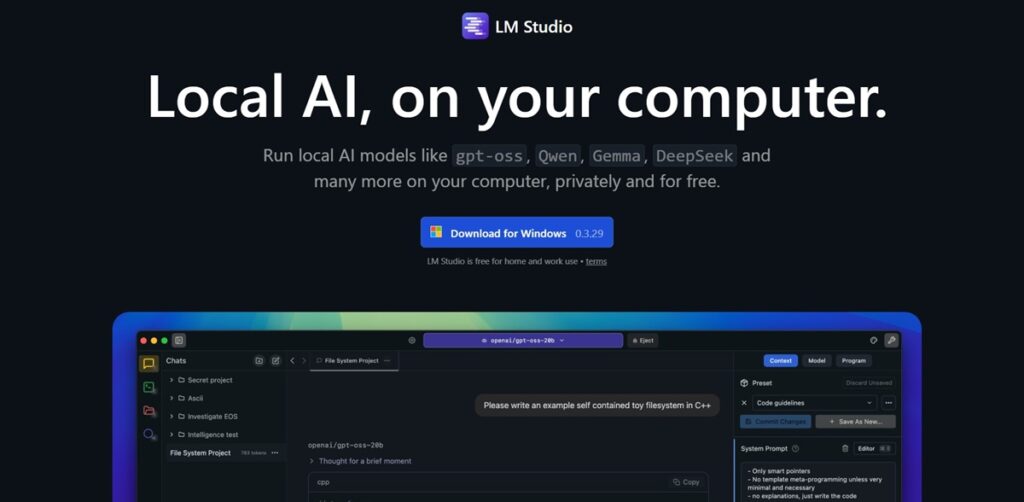
Step 1: Download the Right App
If you’re on Windows or Mac, LM Studio and Ollama are user-friendly options. For Linux, tools like GPT4All or KoboldAI work well. These apps handle the heavy lifting of running the model.
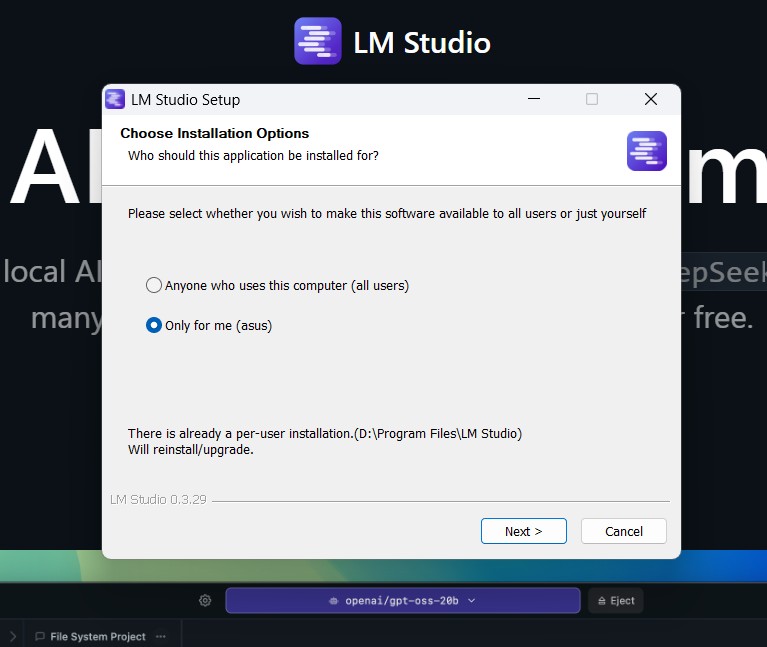
Step 2: Install and Set Up
Follow the app’s instructions to install it. Most guides are beginner-friendly, but expect a few minutes of setup. Make sure your device has enough storage—some models need 10GB or more.
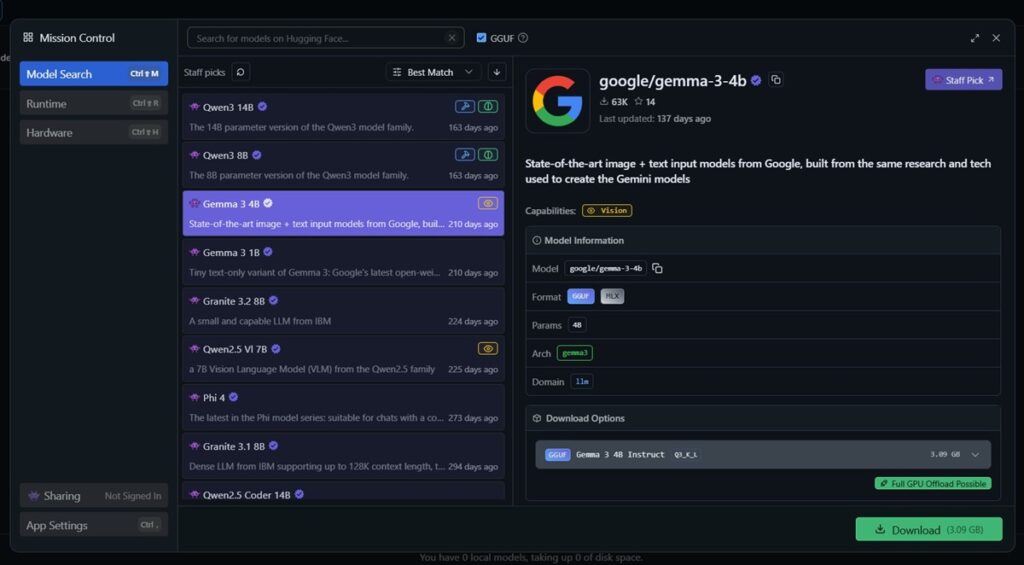
Step 3: Choose Your Model
Pick an open-source model that fits your device. Llama 2 is popular for desktops, while smaller models like TinyLlama or Mistral are great for laptops and even some high-end phones.
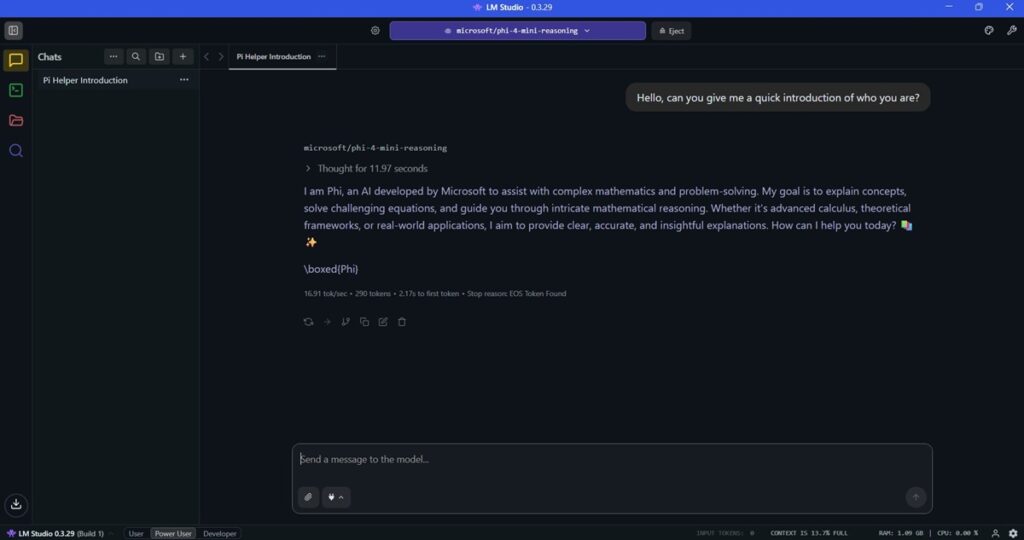
Step 4: Start Chatting
Once installed, open the app and start a new chat. The responses may be slower or less detailed than ChatGPT, but you’ll be fully offline. For quick fact-checks or brainstorming, it does the job.
Limitations of Offline AI Models in 2026
Offline AI sounds appealing, but it comes with real trade-offs. In 2026, local models are useful, but they still can’t match cloud-based systems like ChatGPT. Here’s why.
- Smaller model, limited reasoning: Offline models use fewer parameters, which reduces accuracy, creativity, and their ability to handle complex or nuanced questions.
- No live updates: Without internet access, models can’t refresh knowledge, track real-world changes, or improve over time beyond their original training cut-off.
- High hardware strain: Local inference consumes heavy CPU, RAM, and battery, leading to slower responses, louder fans, and performance drops on older or low-power devices.
Is There a Legal Risk to Running Offline Models?
In most cases, running offline AI models is perfectly legal, especially when you stick to well-known open-source options like Llama and Mistral. These models are released specifically for public use, experimentation, and development, making them safe choices for personal projects and learning. Problems usually start when users chase unofficial “ChatGPT offline” downloads from random websites, which are often scams, outdated builds, or outright malware.
The real legal considerations come into play with licensing. Some models allow free personal use but restrict or regulate commercial applications. If you plan to integrate an offline model into a product, service, or business workflow, always review the license terms carefully. In 2026, staying compliant isn’t complicated, but ignoring licenses can create unnecessary legal and security risks.
Top Use Cases for Offline AI in 2026
Offline AI isn’t about replacing ChatGPT. It’s about staying productive when connectivity isn’t guaranteed. In 2026, local AI models play a strategic role in travel, privacy-focused work, and hands-on learning, especially when speed, control, and reliability matter more than raw power.
Travel and Remote Work
Offline AI shines in environments where internet access is unstable or unavailable. Whether you’re flying, working from remote locations, or dealing with patchy networks, local models let you draft emails, outline reports, brainstorm ideas, and summarize notes without disruption. It keeps your workflow moving when cloud-based tools simply can’t connect.
Privacy-Sensitive Tasks
For confidential work, offline AI offers a clear advantage: your data never leaves your device. This is critical when handling internal documents, legal drafts, research notes, or proprietary information. By running models locally, you eliminate exposure risks, maintain full data control, and reduce dependency on external servers an increasingly important factor in security-conscious environments.
Learning and Experimentation
Offline AI is ideal for developers, students, and researchers who want hands-on experience. Running models locally allows you to experiment with prompts, fine-tune outputs, build prototypes, and understand how AI systems work behind the scenes. It’s a practical, low-risk way to learn, test ideas, and develop real-world AI skills without infrastructure overhead.
How Do Offline Models Compare to Online ChatGPT?
Offline AI has made serious progress, but cloud-based ChatGPT still sets the benchmark. In 2026, the difference comes down to accuracy, speed, and flexibility. Understanding these trade-offs helps you choose the right tool for the job, especially when internet access isn’t guaranteed.
Accuracy and Depth
Online ChatGPT remains the gold standard for reasoning, creativity, and up-to-date knowledge. Its cloud-based architecture allows access to massive models trained on continuously refreshed data. Offline models are improving rapidly, but smaller parameter sizes and static training cut-offs mean they still struggle with complex logic, nuanced writing, and current events.
Speed and Convenience
Offline models eliminate server wait times and function without connectivity, which makes them reliable in no-internet environments. However, local processing can be slower, especially on older or low-power devices. Performance depends heavily on your hardware, while cloud-based ChatGPT delivers consistently fast responses regardless of device limitations.
Customization
Offline models often allow deeper customization, including fine-tuning, prompt optimization, and adding private datasets. This makes them ideal for developers, researchers, and businesses building tailored tools. While ChatGPT offers configuration options, local models provide greater control for specialized workflows, proprietary knowledge, and experimental applications.
What About Offline Voice Assistants?
Offline voice AI is improving fast, but it still trails full ChatGPT-level intelligence. In 2026, assistants like Siri and Google Assistant can handle basic commands, reminders, navigation, and note-taking without an internet connection, making them useful for simple tasks on the move. They’re reliable, quick, and increasingly capable, but not yet built for deep reasoning or complex conversations.
Offline dictation and transcription have also matured. Most modern smartphones now support on-device speech-to-text, allowing you to capture notes, messages, and ideas without sending audio data to the cloud. This boosts privacy, reduces latency, and makes voice input practical even in low-connectivity environments.
More advanced setups combine voice interfaces with local language models, letting users speak directly to offline AI systems. While this still requires some technical configuration, it’s no longer experimental. In 2026, voice-driven offline AI is a real, usable workflow, especially for developers, researchers, and power users.
Should You Use Offline ChatGPT?
If your priority is peak accuracy, deep reasoning, and real-time knowledge, online ChatGPT still wins by a wide margin. Cloud-based models remain unmatched for complex tasks, creative work, and up-to-date insights. But in 2026, offline AI has crossed an important threshold: it’s no longer a novelty. For travel, low-connectivity zones, privacy-first workflows, and hands-on experimentation, local models now deliver real, practical value.
That said, offline AI is a tool, not a replacement. Setup takes effort, performance depends heavily on your hardware, and results can vary. But with the right model and setup, you can draft content, brainstorm ideas, summarize notes, and stay productive when the internet disappears. In those moments, offline AI isn’t just helpful, it’s a productivity lifeline.
So, should you use offline ChatGPT-style tools? Absolutely, when the situation calls for it. Think of them as a reliable backup, a privacy-first workspace, and a playground for learning. They won’t replace cloud AI, but when Wi-Fi fails, they might just save your workflow.
Also, read more about –
- ChatGPT Message Limits in 2026: All You Need to Know
- ChatGPT Bad Gateway Error: What It Means and How to Fix It (2026 Guide)
- Why Is ChatGPT So Slow? Real Reasons (And Faster Fixes) for 2026
- Why Is ChatGPT Not Working? Top Reasons & Quick Fixes for 2026
FAQs About Offline ChatGPT
Are there any risks to running offline AI?
Not if you use reputable open-source models and trusted apps. Avoid pirated or unofficial downloads to stay safe.
Will offline AI ever match online ChatGPT?
Maybe. Offline models are getting better every year. For now, online ChatGPT remains more powerful, but the gap is closing fast.
